Every guarded post you run. One live, searchable record. Your gate, lobby or reception. One live, searchable record.

Manned access control and oversight for any guarded post: gate, lobby, reception, loading bay. The guard taps instead of writing, and head office sees every post live — across every site, on one record. Manned access control and oversight for any guarded post: gate, lobby, reception, loading bay. The guard taps instead of writing, and you see the post live from your phone.

07:49CONTRACTORW. Palmer · Caribbean Cooling · PC-7719 · to A. Simmons · photo
08:02VISITORQR pass scanned · Front Desk · host notified
08:15STAFFK. Walters · walked in · Front Desk
08:31DELIVERYcourier · Loading Bay · signed
08:40WATCHLISTflagged plate · Main Gate · guard warned · head office notified
08:44HANDOVERshift signed over · Main Gate · 6 on property
07:41STAFFM. Brown · shift change · Main Gate
07:58VISITORQR pass scanned · Front Desk · host notified
08:06CONTRACTORCleanSweep Ltd · 3 staff · Service Gate · photo
08:19DELIVERYcourier · Loading Bay · signed
08:27VISITOR9748-HF · A. Simmons · Front Desk · admitted
08:44HANDOVERshift signed over · Main Gate · 6 on property
Under 5 s
Per entry
Offline-first
Logs without a network
Live
To head office
Built for operations that run on manned posts
Transit depots Manufacturing plants Ports & terminals Gated communities Distribution centres Office parks Warehouses Schools
At the post

Your guard's whole job, on one rugged tablet.

The tablet ships pre-configured for your post, mounts in the booth, and works on the site's Wi-Fi or a cellular line we supply. The guard taps, the camera reads the plate, names auto-fill from your directory, and the entry is logged before the driver finishes rolling down the window.

  • Plate recognition auto-fills returning vehicles
  • Staff & fleet vehicles recognized — trucks capture the load sheet in one tapResidents, staff & vehicles recognized from your directory
  • Watch list alerts every guard, every shift, automatically
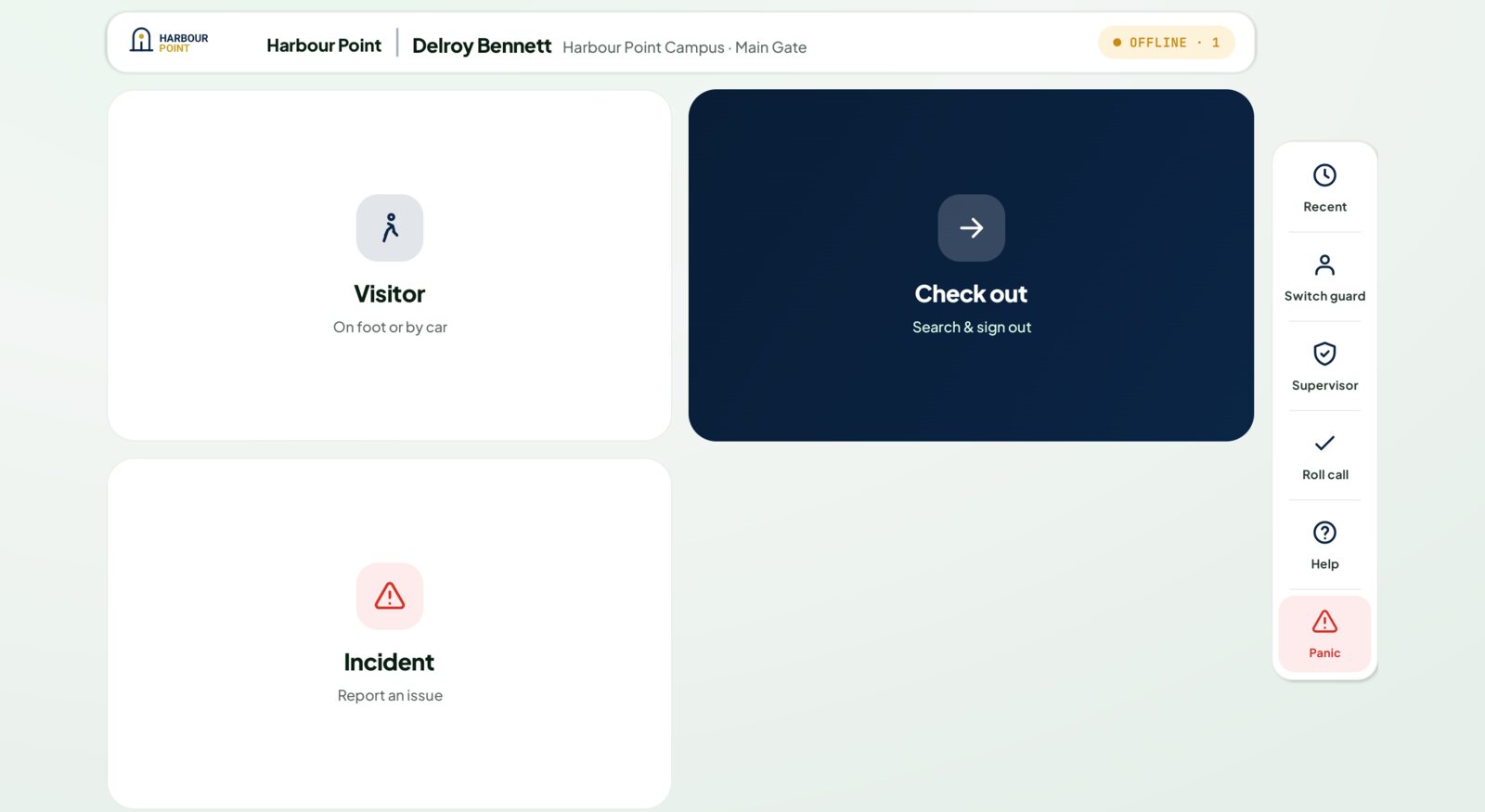
The GateLog tablet home screen at Harbour Point Business Campus, branded Harbour Point, showing Visitor, Check out and Incident tiles with Recent, Switch guard, Supervisor, Roll call, Help and Panic down the side.

Harbour Point Business Campus, demo property, 10 Sep 2026 — the guard's home screen, carrying the property's own brand.
From anywhere

You see every post. Live. From your phone.

No software to install — just a link. Who is on the property right now, who is expected, which contractor signed in and never signed out. Search years of history in seconds, and pull CSV and print-ready reports for boards, owners and auditors.

  • Live count of everyone on the property
  • Full-text search across every entry ever logged
  • Every site in one view — head office drills into any postVisitors receive a QR pass by email or link; the guard scans it at the post
  • CSV and print-ready reports, with timestamps that hold up
Good morning
Harbour Point · live
On property
9
Right now
Today's entries
22
Since midnight
Staff on site
4
Of the 9
Open incidents
1
Unresolved
On site now
Live
Winston Palmer07:49
Junior Barrett07:49
Lennox Barrett07:49

Harbour Point Business Campus, demo property, 10 Sep 2026 — the same record, read on a phone.

The dashboard

This is what head office sees.This is what you see.

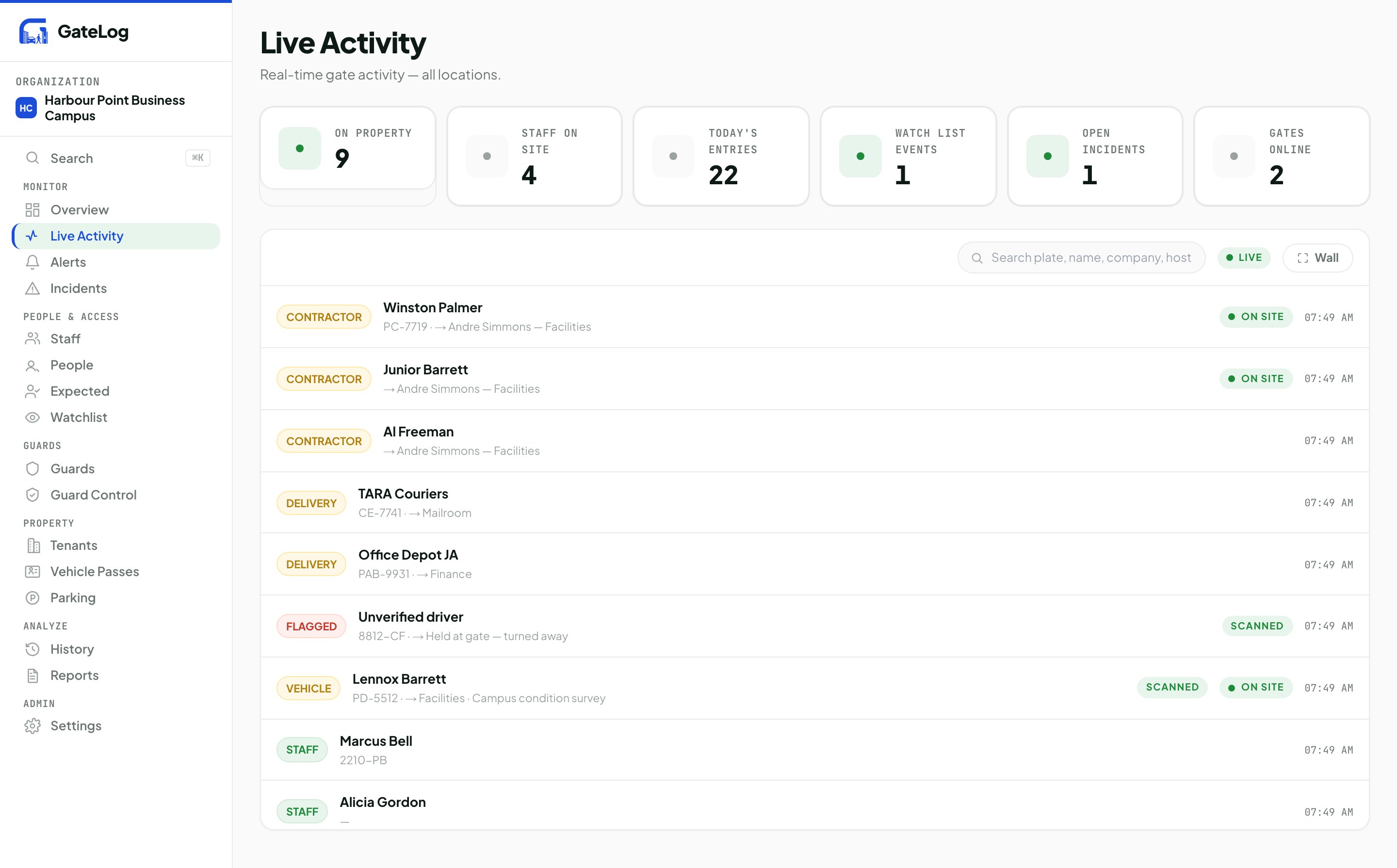
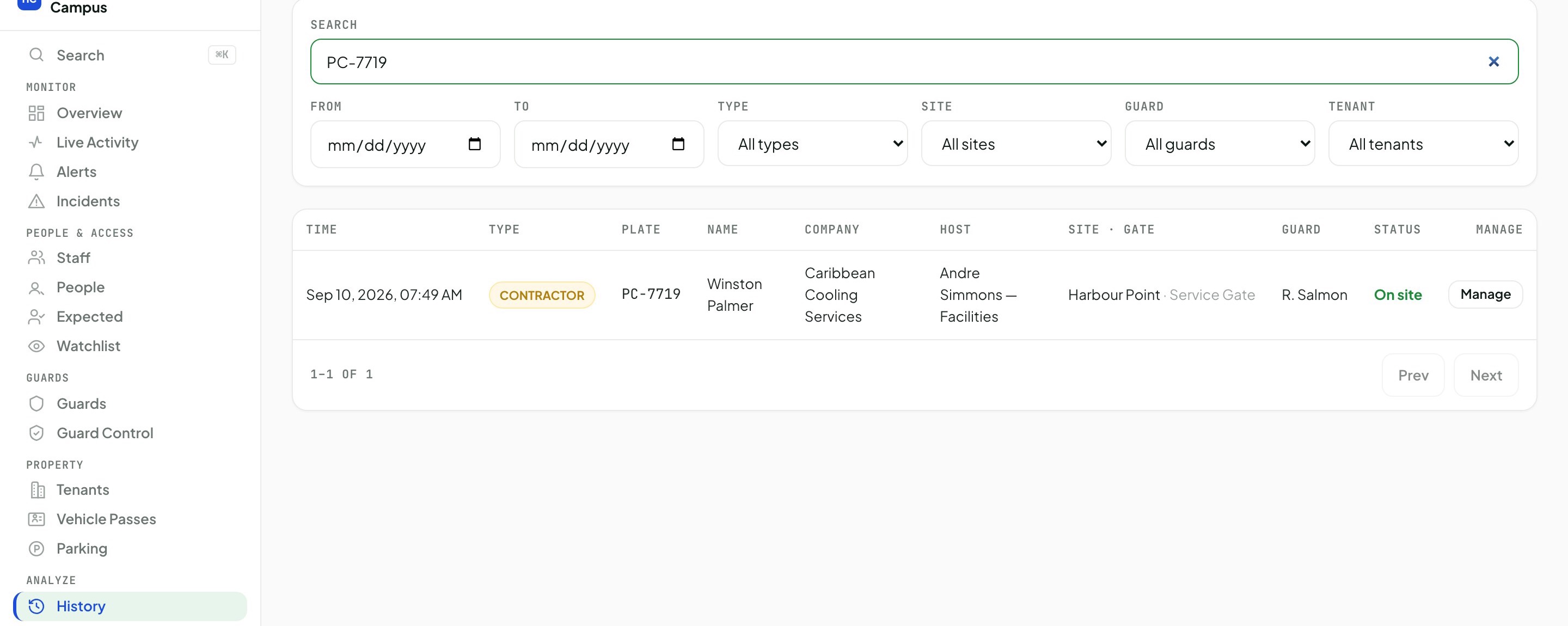
Every post at every site on one screen: who is on the property, what the guards logged, what was held at the gate. Below it, the same record searched — one plate, one entry, with the guard, the host and the gate on it.Your post on one screen: who is on the property, what your guard logged, what was held at the gate. Below it, the same record searched — one plate, one entry, with the guard, the host and the gate on it.

app.gateloghq.com · Live Activity
The GateLog Live Activity screen for Harbour Point Business Campus: 9 on property, 4 staff on site, 22 entries today, 1 watch list event, 1 open incident, 2 gates online, above a feed of contractor, delivery, flagged, vehicle and staff entries.
Harbour Point Business Campus, demo property, 10 Sep 2026
app.gateloghq.com · History
The GateLog History screen filtered to plate PC-7719, returning one entry: Sep 10 2026 07:49 AM, contractor Winston Palmer of Caribbean Cooling Services, host Andre Simmons in Facilities, Harbour Point Service Gate, guard R. Salmon, status on site — with an Export CSV button.
The same property, searched on one plate — 1 of 1
Capabilities

Everything the logbook should have been.

Plate and ID read at the post

The camera reads the plate and the ID, names auto-fill from your directory, and a vehicle that has been here before comes back prefilled.

Every entry names its guard

Who was on the post, which guard logged it, and which gate it came through — carried on the entry itself, not reconstructed from a roster afterwards.

Expected visitors with a QR pass

Registered once, one-tap check-in at the post, the host notified on arrival. No-shows are recorded too.

Incidents, panic, handover, roll call

Photo, video and voice evidence on the incident. Panic straight to head office. Shift handover signed by both guards. Evacuation roll call from the tablet.

Watch list across posts

Flag a person or a plate once. Every post is warned, every shift, without anyone having to remember.

Search years in seconds

A plate typed any way you like, plus names, hosts and notes. Export to CSV, and every search is audited.

Deployment

Phone call to live dashboard in two weeks.

01

Tell us about your posts

How many posts, the traffic they take, what your guard does today, what you wish you could see.

Day 1 · 30 min call
02

We ship pre-configured

Tablet arrives ready. Mount included, connected to the site's Wi-Fi or a cellular line we supply, software set to your post's flow.

Week 1
03

Install & train

We install at the post and walk your guards through it. Confidence within one shift.

One afternoon
04

Live

Entries appear on your dashboard the moment you go live. History builds from day one.

Week 2
Head office

The tablet at the post is yours to control.

Everything below is set from head office, on the fleet you already have in the field — no visit to the post, no app release.

Kiosk mode, built in

The tablet is locked to GateLog and stays locked through a reboot. Exit takes a supervisor PIN, or an unlock from head office.

Your brand, not ours

Your logo and colours on the tablet the guard uses and on the dashboard your managers open.

Tablet home screen, authored remotely

Choose the tiles each post shows and push the change to the field. No app release, no trip to the gate.

Operator roles, scoped per client

Give each operator exactly the sites and posts they are meant to see, and nothing beyond them.

Alerts when a tablet goes quiet

Unplugged, unpinned from kiosk mode, low on battery or dark — head office is told, rather than finding out at the end of the shift.

Attendance link

Clock punches from your time-and-attendance system sit beside the gate record, with a reconciliation report over the two.

Region packs

Plate formats, ID types and address handling shipped per territory. Jamaica today; Cayman, Bahamas and Florida ready.

The company

Built properly. Supported locally.

GateLog is built by Stackcurious Limited, a Jamaican company. One product, built by people who have stood at the posts it is designed for.

The record
Every entry is time-stamped and tamper-evident.
A correction is logged with who made it, when and why — the original is never erased.
Continuity
Backups run nightly and are restore-tested.
The service is health-monitored around the clock, not checked on when something breaks.
Support
Stackcurious Limited is a Jamaican company.
The people who build GateLog are the people who answer when you call, in your time zone.
Next step

Pilot one site. Scale when it's proven.See it run at your post.

Tell us about your sites and rollout thinking. We'll bring a working tablet to one of your posts, run it through a live shift, and put a proper proposal together for the network.Tell us about your property and we'll set up a short demo — at the post with a working tablet, or remotely if easier. No commitment.

Replies within one business day